Your one-stop platform for internet banking and all your financial needs. Explore the all-new BIMB Web.
Download BIMB Mobile

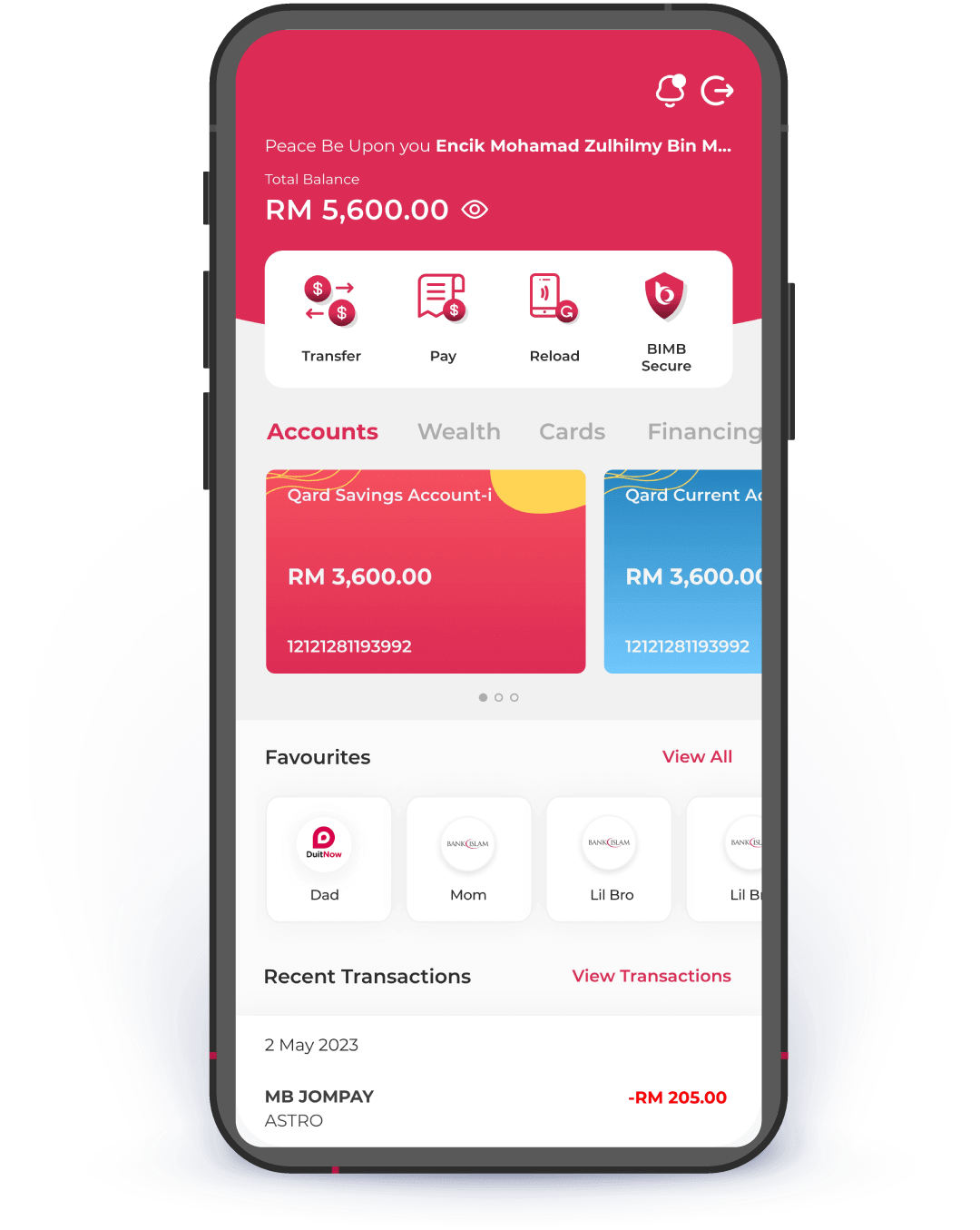
Get ready for a whole new banking experience.

New UI UX
Navigate faster to what you need.
Better Navigation
Experience faster load times and smoother transitions, making your banking more efficient.
Enhanced features
More tools at your fingertips

How to switch to our new BIMB Mobile?

Meet Your Financial Companion - Simplify Your Banking with BIMB
Experience effortless banking with BIMB—where managing your finances is as easy as a tap. Our app is tailored to fit your unique needs, making every transaction a step closer to your financial goals. Download now, and let's take the journey to financial freedom together.

Here's what you need to know before switching to BIMB

Your favourites will automatically move to the new BIMB.
All recurring & future dated transactions will not be transferred.
Once you switch, you will no longer have access to the previous Bank Islam Internet Banking.

Frequently Asked Questions

Switching to BIMB Mobile & BIMB Web

As a new customer, you need to register for BIMB Web and BIMB Mobile. GO by Bank Islam app is no longer available for download from any app store, and first-time users cannot register for Bank Islam Internet Banking.
I am an existing Bank Islam Internet Banking and GO by Bank Islam user. Will I be automatically switched to the BIMB Mobile and BIMB Web?
Bank Islam Internet Banking and GO by Bank Islam users will not be automatically switched to BIMB Mobile and BIMB Web. Bank Islam Internet Banking and the GO by Bank Islam app will still be available until the end of 2025.
Are there any fees associated with switching to the BIMB Mobile and BIMB Web?
There are no fees imposed for switching from Bank Islam Internet Banking and GO by Bank Islam app to BIMB Mobile and BIMB Web. It is a free upgrade provided to enhance your banking experience.
Can I continue using Bank Islam Internet Banking and GO by Bank Islam app, if I do not want to switch right now?
Yes, you can continue using them.However, by the end of 2025, your access to Bank Islam Internet Banking and GO by Bank Islam apps will be discontinued. We highly recommended switching to BIMB Mobile and BIMB Web as soon as possible for a better banking experience.
Can I revert to the previous Bank Islam Internet Banking and GO by Bank Islam app, after switching to BIMB Mobile and BIMB Web?
Once you switch to BIMB Mobile and BIMB Web, you won’t be able to revert to Bank Islam Internet Banking and GO by Bank Islam app.
What happens if I do not switch to the BIMB Mobile and BIMB Web by the end of 2025?
If you do not switch by the end of 2025, your access to the Bank Islam Internet Banking and GO by Bank Islam app will be discontinued, and you will need to use the BIMB Mobile and BIMB Web to manage your banking services.
Do I need to reactivate online access after switching to BIMB Mobile and BIMB Web?
No activation is required.
Will there be a cooling-off period when I switch to the BIMB Mobile and BIMB Web?
No. However, a cooling-off period applies if you are already in a cooling-off period from the previous Bank Islam Internet Banking or GO by Bank Islam app.
Will my Favourite accounts list from Bank Islam Internet Banking be available in BIMB Mobile and/ BIMB Web?
Yes, all your previously set up Favourite accounts will be available in BIMB Mobile and BIMB Web. No re-setup is needed.
What are the services/ features that are not auto transferred to BIMB Mobile and BIMB Web?
Services and features that are not carried over from Bank Islam Internet Banking and GO by Bank lslam app when you switch to BIMB Mobile and BIMB Web include:
  1. Future Dated and Recurring Payments will be stopped when switched. Customers need to re-set them up in BIMB Mobile or BIMB Web.
  2. Transaction History from Bank Islam Internet Banking and GO by Bank Islam app will not appear in BIMB Mobile and BIMB Web.
  3. The GO by Bank Islam app cannot scan QR codes generated by BIMB Mobile. However, BIMB Mobile can scan QR codes generated from GO by Bank Islam app.
  4. Transaction limits need to be set up again in BIMB Mobile and BIMB Web.
I tried to switch to the BIMB Web and BIMB Mobile but encountered error. What should I do?

If you encountered error, for instant assistance, connect with Chatbot Adam at www.bimb.com. You can also call our Contact Center at 03 2690 0900 or email us at contactcenter@bankislam.com.my for assistance. Alternatively, you may visit any Bank Islam branch for support.

BIMB Mobile Account Setup

As a new customer, you need to register for BIMB Web and BIMB Mobile. GO by Bank Islam app is no longer available for download from any app store, and first-time users cannot register for Bank Islam Internet Banking.
I am an existing Bank Islam Internet Banking and GO by Bank Islam user. Will I be automatically switched to the BIMB Mobile and BIMB Web?
Bank Islam Internet Banking and GO by Bank Islam users will not be automatically switched to BIMB Mobile and BIMB Web. Bank Islam Internet Banking and the GO by Bank Islam app will still be available until the end of 2025.
Are there any fees associated with switching to the BIMB Mobile and BIMB Web?
There are no fees imposed for switching from Bank Islam Internet Banking and GO by Bank Islam app to BIMB Mobile and BIMB Web. It is a free upgrade provided to enhance your banking experience.
Can I continue using Bank Islam Internet Banking and GO by Bank Islam app, if I do not want to switch right now?
Yes, you can continue using them.However, by the end of 2025, your access to Bank Islam Internet Banking and GO by Bank Islam apps will be discontinued. We highly recommended switching to BIMB Mobile and BIMB Web as soon as possible for a better banking experience.
Can I revert to the previous Bank Islam Internet Banking and GO by Bank Islam app, after switching to BIMB Mobile and BIMB Web?
Once you switch to BIMB Mobile and BIMB Web, you won’t be able to revert to Bank Islam Internet Banking and GO by Bank Islam app.
What happens if I do not switch to the BIMB Mobile and BIMB Web by the end of 2025?
If you do not switch by the end of 2025, your access to the Bank Islam Internet Banking and GO by Bank Islam app will be discontinued, and you will need to use the BIMB Mobile and BIMB Web to manage your banking services.
Do I need to reactivate online access after switching to BIMB Mobile and BIMB Web?
No activation is required.
Will there be a cooling-off period when I switch to the BIMB Mobile and BIMB Web?
No. However, a cooling-off period applies if you are already in a cooling-off period from the previous Bank Islam Internet Banking or GO by Bank Islam app.
Will my Favourite accounts list from Bank Islam Internet Banking be available in BIMB Mobile and/ BIMB Web?
Yes, all your previously set up Favourite accounts will be available in BIMB Mobile and BIMB Web. No re-setup is needed.
What are the services/ features that are not auto transferred to BIMB Mobile and BIMB Web?
Services and features that are not carried over from Bank Islam Internet Banking and GO by Bank lslam app when you switch to BIMB Mobile and BIMB Web include:
  1. Future Dated and Recurring Payments will be stopped when switched. Customers need to re-set them up in BIMB Mobile or BIMB Web.
  2. Transaction History from Bank Islam Internet Banking and GO by Bank Islam app will not appear in BIMB Mobile and BIMB Web.
  3. The GO by Bank Islam app cannot scan QR codes generated by BIMB Mobile. However, BIMB Mobile can scan QR codes generated from GO by Bank Islam app.
  4. Transaction limits need to be set up again in BIMB Mobile and BIMB Web.
I tried to switch to the BIMB Web and BIMB Mobile but encountered error. What should I do?

If you encountered error, for instant assistance, connect with Chatbot Adam at www.bimb.com. You can also call our Contact Center at 03 2690 0900 or email us at contactcenter@bankislam.com.my for assistance. Alternatively, you may visit any Bank Islam branch for support.

BIMB Web Account Setup

As a new customer, you need to register for BIMB Web and BIMB Mobile. GO by Bank Islam app is no longer available for download from any app store, and first-time users cannot register for Bank Islam Internet Banking.
I am an existing Bank Islam Internet Banking and GO by Bank Islam user. Will I be automatically switched to the BIMB Mobile and BIMB Web?
Bank Islam Internet Banking and GO by Bank Islam users will not be automatically switched to BIMB Mobile and BIMB Web. Bank Islam Internet Banking and the GO by Bank Islam app will still be available until the end of 2025.
Are there any fees associated with switching to the BIMB Mobile and BIMB Web?
There are no fees imposed for switching from Bank Islam Internet Banking and GO by Bank Islam app to BIMB Mobile and BIMB Web. It is a free upgrade provided to enhance your banking experience.
Can I continue using Bank Islam Internet Banking and GO by Bank Islam app, if I do not want to switch right now?
Yes, you can continue using them.However, by the end of 2025, your access to Bank Islam Internet Banking and GO by Bank Islam apps will be discontinued. We highly recommended switching to BIMB Mobile and BIMB Web as soon as possible for a better banking experience.
Can I revert to the previous Bank Islam Internet Banking and GO by Bank Islam app, after switching to BIMB Mobile and BIMB Web?
Once you switch to BIMB Mobile and BIMB Web, you won’t be able to revert to Bank Islam Internet Banking and GO by Bank Islam app.
What happens if I do not switch to the BIMB Mobile and BIMB Web by the end of 2025?
If you do not switch by the end of 2025, your access to the Bank Islam Internet Banking and GO by Bank Islam app will be discontinued, and you will need to use the BIMB Mobile and BIMB Web to manage your banking services.
Do I need to reactivate online access after switching to BIMB Mobile and BIMB Web?
No activation is required.
Will there be a cooling-off period when I switch to the BIMB Mobile and BIMB Web?
No. However, a cooling-off period applies if you are already in a cooling-off period from the previous Bank Islam Internet Banking or GO by Bank Islam app.
Will my Favourite accounts list from Bank Islam Internet Banking be available in BIMB Mobile and/ BIMB Web?
Yes, all your previously set up Favourite accounts will be available in BIMB Mobile and BIMB Web. No re-setup is needed.
What are the services/ features that are not auto transferred to BIMB Mobile and BIMB Web?
Services and features that are not carried over from Bank Islam Internet Banking and GO by Bank lslam app when you switch to BIMB Mobile and BIMB Web include:
  1. Future Dated and Recurring Payments will be stopped when switched. Customers need to re-set them up in BIMB Mobile or BIMB Web.
  2. Transaction History from Bank Islam Internet Banking and GO by Bank Islam app will not appear in BIMB Mobile and BIMB Web.
  3. The GO by Bank Islam app cannot scan QR codes generated by BIMB Mobile. However, BIMB Mobile can scan QR codes generated from GO by Bank Islam app.
  4. Transaction limits need to be set up again in BIMB Mobile and BIMB Web.
I tried to switch to the BIMB Web and BIMB Mobile but encountered error. What should I do?

If you encountered error, for instant assistance, connect with Chatbot Adam at www.bimb.com. You can also call our Contact Center at 03 2690 0900 or email us at contactcenter@bankislam.com.my for assistance. Alternatively, you may visit any Bank Islam branch for support.

BIMB Mobile App Logo - Official Bank Islam Digital Banking Icon
The official BIMB Mobile app logo represents the Bank Islam digital banking experience.

Download

BIMB Mobile